Friday, January 8, 2021

LEARN HOW TO DELETE A BOARD ON PINTEREST THIS 2021


Pinterest is one of the most trending websites that users are surfing over. Using this platform one can check out the latest images and pins shared all over the platform. The medium is also in use for marketing purposes to run commercial business over the same. But, there can be situations where you created a board and uploaded several pins on Pinterest for your audiences, and now you are willing to delete the same for any reason. Some of them can be:


  • A board is irrelevant to your niche
  • You may find it similar to the other's board
  • A board with lesser pins
  • Having few followers of the pin
  • You no more found the board interesting/eye-catchy any more

So, the question here arises, "how to delete a board on Pinterest?"


Deleting a board on Pinterest isn't strenuous at all. Several pins make the board, so let's start with how to edit/delete these pins. 


If you need to edit your pin, follow the steps below:


  • Log in to your Pinterest account
  • Bang on your profile picture
  • Select the pin you wish to edit
  • Clicking on it will help you see the edit options, like title, description, etc.
  • Once you edit them, tap on save.

But when it comes to deleting your pin, check out the steps mentioned below to go on:


  • Once you log in to your account on Pinterest,
  • Tap on your profile pic
  • Click the pin you are willing to delete
  • Selecting a pin will help you see a pencil icon where you will find the delete option,
  • Bingo, your pin is deleted.

Note: Once you delete a pin on Pinterest, you won't be able to undo the same. The pin gets deleted once and for all.


Now, after learning about editing/deleting a pin, let's proceed with how to delete a board on Pinterest:


  • Open your Pinterest app and sign in.
  • Tap on your profile on the upper right corner
  • The board you are willing to select must be saved
  • Tap on the board you want to delete and click on the pencil icon 
  • When you scroll down over the board, you will find the delete option
  • Click on "Delete," and you are over it.

But,

learn-how-to-delete-a-board-on-pinterest-this-2021

What happens after you delete a board on Pinterest?

As soon as you delete a board, all the pins get deleted permanently, and all the followers will disappear. But, there can be repins saved by your followers. So, the repins remain even if the original board gets deleted.

Now, how to repin the pin?

Repining is adding the image on your board that you found interesting while surfing on Pinterest. You can repin by:

  • Choose the pin you like
  • Click on the pin you wish to repin
  • Select the board you want to save in
  • Edit the description of the same
  • Now you are all set to share on different social media platforms.

Not only this, but you can also try numerous automation tools to manage your Pinterest accounts without any human interference. It not only lowers your stress but also handles your accounts quite well. Some of the best social media management tools are as follows:


Socinator:

Socinator acts as a pin dominator and helps you schedule your posts, along with analyzing the reports and statistics of your Pinterest accounts. It also allows you to add videos and various marketing techniques to increase your followers. The pin dominator helps you create infinite boards as well. Overall, Socinator can be the best choice to handle your account over Pinterest.


Tailwind:

One of the best things about Tailwind is, Pinterest has approved it as an automation tool. You can schedule your pins by dragging and dropping the pins you wish to pin at different time slots. Not only this but, it also advises its users about the best time to post a pin on Pinterest, which is quite interesting. 


PinFollow:

If you are really willing to increase your followers on Pinterest, PinFollow can be the best choice. Having numerous Pinterest followers depicts the popularity and credibility of the user/brand. The tool handles all the following requests and auto-accepts/cancels the same as per their relevance. 


Wrapping Up:


So, this is how to delete a board on Pinterest with such quick and easy steps. And I really hope that the article helped my readers understand the same in a much better way. So, what are you waiting for? Go on and edit and delete the pins/board you want to. 

Tuesday, January 5, 2021

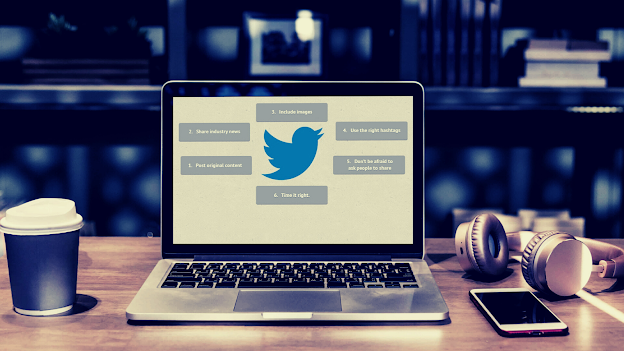
Increase Your Twitter Engagement Rates With These Top 7 Tips


Twitter has been one of the most trending social media platforms since 21st March 2006. Jack Dorsey, Noah Glass, Biz Stone, and Evan Williams launched this microblogging website for different people to share their views and thoughts over this medium. Twitter is in demand for tweeting posts and getting numerous ideas for various fields, like Bollywood, politics, etc. 


But, apart from this, Twitter marketing is also quite beneficial for online businesses and platforms, and it is the reason with more than 330 million monthly and 145 million daily active users. Surfing on this platform seems quite interesting. But when it comes to marketing, the marketers need to work a bit harder, as it involves Twitter engagement rates, clicks, and conversions. 

Now, you might be a bit confused about what exactly these engagement rates are?


Engagement is one of the biggest reasons why people post on Twitter, as it creates an interest for the user and increases traffic on your website. Users can interact with you in the following ways:


  • Retweeting
  • Replying
  • Following
  • Liking
  • Using trending hashtags
  • Managing multiple Twitter accounts
  • Following your links
  • Viewing your cards
  • Viewing embedded media
  • Expanding your tweet, and more. 

So, what are we waiting for? Let's begin with getting to know the top 10 tips for increasing engagement rates for marketing successfully on Twitter. 


1. Engage, Engage & Engage:

If you want your users to engage with your posts, try engaging yourself with your competitor's content or tweets/retweets. You can also go for some other actions, like:

  • Liking and sharing their content
  • Responding to their tweets
  • Following them
  • Retweeting their tweets, and more.

And so, you will be able to build a great bond between you and the users, and it will benefit your business a lot. 


increase-your-twitter-engagement-rates-with-these-top-7-tips

2. Share Links:

One of the best and easiest methods to get clicks on your website is to add links to your website. It will help the users to direct themselves automatically to your page. Links act as an eye-catcher for users to spread brand awareness about your product and services. And, soon, people will start sharing your page links to get more traffic. 


3. Tweet At The Best Time:

Before tweeting any post or content, you should know the best time for the same. Examine the time when Twitter has more number of active users on it, and try to post content over that time. It will not only increase the Twitter engagement rates but will leave a positive impact on the users. 


4. Hashtags Are A Must:


Use the most trending and eyeball popping hashtags on your tweets to gain more engagement rates. According to a survey, increasing of almost 1065% engagement is the main reason why hashtags are necessary. Try to add at least one hashtag in your content to gain maximum response to your tweets. 


5. Go For Automation Tools:

If you are a fresher in the Twitter marketing field, it's better to go for automation tools for handling your business profile. Automation tools help its users to auto-publish the posts, find and extract engaged users, retweeting, auto-likes/comments, and more. Overall, it's a time-saving effort. 


6. Respond On Time:

To build a strong relationship between you and your users, you must respond to your followers and users on time. Clear every query they have in the best possible way to leave a significant impression on them about your business. Also, avoid disappointing your audiences as it may lower your brand's reputation in their eyes. 


7. Post High-Quality Content: 

The content you post should be of high-definition quality, unique, and attractive enough to catch the user's eyesight. Images are a creative way to gain engagement rates, but videos give real-time users to the tweeters. So, post images/videos with proper specifications to avoid any error. 


Wrapping Up:

So, I hope these top 7 tips to increase Twitter engagement rates helped my readers, marketers, and freshers to understand the concept quite professionally. Hence, before commencing Twitter Marketing, go through them to prepare yourself in advance. 

Monday, January 4, 2021

Using Tool Reddit? Here Are 03 Ways To Do Effective Brand Promotion & Marketing

using-tool-reddit-here-are-03-ways-to-do-effective-brand-promotion-marketing

Successful brand promotion is something every business craves. While everyone is trying to engage audiences on social media platforms like Instagram, YouTube, Twitter, and Facebook, they often overlook the biggest perk that comes along with the most engaging community, Reddit.


But, do you know? Reddit currently possesses more than 50,000 communities that consist of 250+ million active members from all over the world. At the same time, this platform fetches around 8 billion monthly page views.


With these fringe benefits in mind, a lot of brands have already started migrating to Reddit. And, this practice doesn’t seem to come to an end since Reddit is growing every minute.


In case you are also skeptical about investing time & effort on this excellent platform, then make sure to combine your marketing strategies with the exceptional capabilities of Tool Reddit designed for easing up the entire proceedings. Meanwhile, take some time to read our tips for effective brand promotion on Reddit.


Switch To Paid Ads


using-tool-reddit-here-are-03-ways-to-do-effective-brand-promotion-marketing


Marketing on Reddit is quite affordable, plus less time-taking. On average, the budget required for daily advertisement is a mere $4 to $5. When you keep everything in place and use correct strategies, then such a little amount can get enough value to your brand.


The best thing about this community is that your posts reach the right people: who are indeed interested in your product/services. Redditors don’t have spare time to waste on meaningless comments and clashes as folks do on other social networking sites.


Don’t Ignore ‘r/Deals’ Subreddit.


using-tool-reddit-here-are-03-ways-to-do-effective-brand-promotion-marketing

Marketers head to numerous subreddits without precise knowledge about which one is going to be the most beneficial. As we know, Reddit is not typically a place for promotion. Consequently, brands tend to offer timely deals to lure Redditors. By doing so, they can easily encourage them or get their attention.


Here, you ought to choose the ‘r/Deals’ to stand out from the crowd, who are trying to rule the roost. This spot is also perfect because most of your potential customers are likely to search for fancied offers.


Use Reddit As Social Proof


using-tool-reddit-here-are-03-ways-to-do-effective-brand-promotion-marketing

Trusting online reviews is a bit skeptical for people these days. At this point, Reddit works as a boon for businesses. Research claims that 70% of Redditors end up buying desired products/services after trusting the feedback from previous customers.


Apart from using Reddit for showcasing your offers, spend a good chunk of time investigating negative reviews to fix the issues on time. For instance, present them compensation such as refund, replacement, or notable discount on the next buy (in case customer faces minor issues).


Also, Look At: Why Reddit Is a Must For Serious Marketers?


using-tool-reddit-here-are-03-ways-to-do-effective-brand-promotion-marketing

Even though Reddit is still an underutilized social media platform, marketers prefer to fuel up their campaigns using this community.


Let’s have a look at some solid reasons to give a try to Reddit:-


  • When it comes to ranking, Reddit ranked 6th position among high ranking websites in the USA.  Meanwhile, this ranking comes down to 20th in terms of worldwide statistics.

  • Another unique benefit of using the tool  Reddit is a strict policy violation and spamming guidelines. A little suspicious activity is enough to alert moderators and provoke them to archive the thread as soon as possible. Thus, know - how to how post an image on Reddit.


  • Reddit acquires more than 1,50,000 communities, which gives it a proud tag of ‘Gold Mine’ for businesses.


  • About daily user time, this remarkable community earns 11.29 daily user time.

Extra Tip: Design Quality Content


Reddit is all about sharing quality content. Brands join this community with the sole purpose of getting their content featured on the homepage, however, that’s a nerve-wracking goal to accomplish.


On the other side, having content on the homepage drives bulk of traffic to your posts because it has millions of genuine users. And, don’t forget to choose an appropriate subreddit for maximum exposure.


Conclusion


Bear in mind that brand promotion on Reddit is fun! No matter if your brand is well-established or it has lately been launched, the tool Reddit gives you an ideal place to listen to folks, explore more about them, and set out productive strategies.


How To Auto Upvote Posts On Reddit Using Socinator?


Thursday, November 12, 2020

Top 07 Twitter SEO Tips: How To Get More Traffic?

top-07-twitter-seo-tips-how-to-get-more-traffic

We all know that Twitter has massive users across the world, making it another exceptional platform for brands to promote their products or services.


If you are still not using Twitter in 2020 (and beyond), you are definitely missing out on the biggest perk. But, it's never too late to initiate. By using some simple Twitter SEO tips, you can make your tweets and profile link rank on the top.


How To Do Twitter Correctly?


Pick a Relevant Handle

top-07-twitter-seo-tips-how-to-get-more-traffic

Choosing a random Twitter handle is not a smart idea. Both the username and handle must align your brand/Twitter campaign. This simple mechanism can help you a lot in future search indexing that ultimately contributes to effective promotion. Therefore, do a quick research before you select anything related to your Twitter profile.

Choose a Suitable Name

In the entire process of Twitter account optimization, the name plays a vital role. It is something that appears next to every Twitter profile, even on search engine results. Choosing this name in a rush can hamper the potential success of the account. Take some time to tumble across popular profiles in your niche, fetch some ideas, and create yours.

Improve The Title Tag


top-07-twitter-seo-tips-how-to-get-more-traffic

Besides the username, don’t forget to optimize your real name written over the Twitter profile. Audiences won’t waste time in recognizing the brand through giving username. Instead, everyone wants to see the actual name when a Twitter profile appears in the search engine via Twitter SEO. So, make sure to write the full name and use the same as anchor text.

Focus On Bio


When visitors see your profile for the first time, they get further ideas from the bio area. Utilize every single character to draft an eye-catchy yet brief bio that encourages visitors to take a look at the account. Here also, one should keep in mind the brand. 


Promote, Promote, and Promote

top-07-twitter-seo-tips-how-to-get-more-traffic

Once done with all the crucial steps, including profile setup & bio, sit down calmly to find out powerful ways of building a reputation over the web. You can use different social media platforms where engagement is high. For instance, place CTA buttons that say, “Follow Us On Twitter”, “Check out our Twitter profile”, or “Twitter”.

Leverage URL section

Twitter allows users to add their preferred URL in the account setting option. Take advantage of this assistance and place a link that redirects people to your brand’s main website. Over the years, this approach has been deriving fabulous outcomes for businesses. Moreover, highlighting this link is also an ideal means to get maximum exposure.

Use Hashtags Strategy


top-07-twitter-seo-tips-how-to-get-more-traffic

Just like Instagram, Twitter also lets you use hashtags in Tweets. But, using random hashtags has nothing to do with growing engagement. Every single hashtag must be relevant to the brand and of course, the profile. Invest a good chunk of time in researching relevant hashtags and then pick trendy ones.


Other Beneficial Ideas:-


Impact Of Video And Images On Twitter


According to experts, Tweets with visuals get more engagement than simple ones.


So, more clicks give a higher ranking. We have seen various examples of Twitter users who have earned overnight popularity with the use of engaging videos. Straight to the point, brands struggle a lot as compared to personal profiles with entertaining content.


Marketers should figure out the correct strategy available for fabricating the perfect blend of fun with meaningful information.


Bring Consistency


Being consistent doesn’t mean posting in bulks. No matter which social networking platform businesses use for brand promotion or trying to manage multiple twitter accounts, active presence is mandatory.


Tweeting multiple times, that means 4-5 times a day, seems a good fit. Exceeding this limit might impact the quality of content because time management is indeed propitious.


Interaction With Followers


A business cannot flourish unless it understands the importance of followers count. Sometimes, reply to followers, like their tweets, and appreciate their efforts. 


Conclusion


Reading is not enough. Keep the guts to try out unique ways to make your Twitter profile popular. Best Twitter SEO tools have helped thousands of brands in reaching their milestones and stand out from competitors. We hope that this description is of great use to everyone.


Also, Watch This Video On How To Auto Follow Back On Twitter Using Socinator


Saturday, October 31, 2020

How To Change Name On YouTube? Few Steps To Clear Your Doubts!


Seems like the YouTube name you had selected when you first landed on this popular platform is holding you back from reaching that NEXT subscriber milestone? Don't worry! You have landed in the right place. Here we will help you reinvent your YouTube channel without having to start with a new one. 

Basically, this article will clear all your doubts on 'How to change name on YouTube' along with giving your channel a drastic makeover. But before we begin, keep one thing in mind that this article will focus entirely on changing the name of your channel, i.e., the name, that pops up  when someone visits your channel's home page. 

Also, keep in mind that Google won’t let you change the name of your channel several times! So make sure to give it some thought before going through the procedure.

Changing The YouTube Name If Someone Has A Non-Branded, Standard Account


While you go on changing the name of your non-branded YouTube channel, the name on your other linked accounts might also change, ex., Gmail. Well, this is so because the name associated with the Google account is being changed. 

But if anyone has a Brand Account on YouTube, then scroll down to the next section for complete instructions. The steps given below can be a great way to YouTube For Beginners queries. 

Step 1: Quickly sign in to your account on YouTube. Well, to do so, tap on the 'Sign In' option on the top right of the YouTube homepage and fill in your creds.

Step 2: Tap on your PP (profile picture) and then select the settings option from the drop-down menu bar.

Step 3: Just under the 'Your YouTube Channel' section, choose the 'Edit On Google' option to correct your name. 

Step 4: Once you have completed doing step 3, you will get landed on screen, where you will have to fill out your 'First' and 'Last' name to what you actually want your YouTube channel to be called. Tap on the 'Save' button to end the process.

Changing The YouTube Name If Someone Has A Branded Account


If you have a Brand account on YouTube, then you can easily change the channel's name without having to change the name on Gmail. We can think of several reasons why this is useful, especially to keep your personal and professional accounts separate. Given below are the steps that one can follow to do so! Read them carefully and clear-out your confusion on 'How to change name on YouTube'!

Step 1: Open YouTube and sign in to your account. Tap on the profile picture icon of your Youtube channel. 

Step 2: Once done, click on the 'Settings' option from the drop-down menu bar.

Step 3: After that, the YouTube account settings screen will open. Click on the 'Edit On Google' option. Just after that, your accounts 'About me page' will open. 

Step 4: Then, a square-shaped window will open. Edit your YouTube name in the 'Text Box' beneath the 'Word Name'!

Step 5: Now, tap on the 'OK' option to save all your changes, and you are done.

Also watch: How To Auto Increase Views On YouTube Using Socinator.


Time to wrap up!


The ones who are on YouTube for several years and rarely post any videos, face a lot of issues in getting the exact fame and popularity they want or to get YouTube subscribers they wanted for so long. 

See, posting videos regularly and giving the right content to the audience will definitely help you gain immense traffic. But along with that, you also need to select the right name for your YouTube channel, which can actually bring more eyeballs towards it. Still, some people fail to do so and then crib for changing their channel's name on YouTube afterwards because of a wrong decision. Hopefully, this article can help all of them out there to get an exact idea on - How to change name on YouTube. 

Tuesday, July 28, 2020

Top 05 Social Media Sites To Use [Your 2020 Bucket List]


Trending social media sites such as Instagram and TikTok have undoubtedly grabbed tremendous popularity and are ruling over the social media world via mobile devices. Basically, this is something that most of the social networking websites have failed to deliver. 

Talking about social media marketing, then Facebook comes on the top of the marketer's wishlist. But how to decide which of the social platforms are going to be perfect for your marketing campaign?

Don't worry! We have created a bucket list for you to help you get detailed information about the top 6 social media platforms of 2020! Here in this article, we have picked up the most popular social media sites to help you level up the marketing game. 

1. Instagram


Being the home of all the popular influencers, bloggers, brands, small businessmen, teens, and everyone among them, Instagram is known to be the world's most popular social networking site with over 500 million daily active users. 

Now the question arises who all are on Instagram? Well, as we discussed earlier, Instagram is a favorite social media platform for adults, teens, especially in the United States. But it has now become the Best Marketing Tools For Startups and for people of different age groups all over the world. 

2. YouTube


YouTube today stands out to be the second most used social networking site worldwide, just beside its progenitor company, Google! If you want to promote your business brands and products in the form of a video, then this platform is going to be the best for you. 

Talking about the video duration, then it really depends on the type of business you owe and who your audiences are! But as we all know, YouTube gives a fair chance to all sorts of videos. Whether it's a long-form or short-form video, if presented in the right manner, then it's surely going to grab the attention of thousands of people. 

Mostly this platform is used for watching entertaining or educational videos. So all you can do is, you can teach your audience about the different marketing tactics, or you can even showcase your brand or product to make them aware. 

3. Facebook


With almost 2.5 billion monthly active users, Facebook undoubtedly is the world's largest social media platform. Whether you are a teen looking for making new friends, or a professional marketer seeking opportunities to promote your business online, Facebook is going to be the perfect platform for you. 

Marketers can make use of this astonishing platform to advertise their brand or product in front of a large number of audiences and thus convert them into customers. 

4. Twitter


While the number of monthly active users on Twitter has consistently hovered around 300 million for a while now, 40% of those users are active multiple times a day on the site, suggesting if your audience uses the platform, they are likely to be very engaged! 

The popularity of this social media site continues to be high among the tech-savvy users and is particularly active in today's politics, marketing, and business-related to B2B verticals. People even look for various Twitter analytics tools to make their business grow in a much better way.

5. Pinterest


How can we forget about this excellent platform! Well, Pinterest has become the most famous social bookmarking tool for gathering ideas and seeking out creative thoughts when it comes to things like cooking, DIY home designs, interior design, vacation ideas, business, and much more. This social media platform is also often cited as a vital part of the product discovery journey, with an audience predominantly comprising female users.

Conclusion


No matter which social networking sites you are going to use in 2020, you will have to first understand what you actually want. Hopefully, this bucket list is going to help you a lot, as here we have talked about the best social media sites in depth. Now, it's your turn, so choose wisely. 

Monday, July 20, 2020

Top 05 Automation Tools With Instagram Direct Message Service Option

top-05-automation-tools-with-instagram-direct-message-service-option

Messaging services are not new in this business world! Today, we all use free, fast, and enjoyable messaging options like Google Hangouts, WhatsApp, though most of the businesses stuck to the trend of messaging through different social media networks. Facebook messenger has been a really popular app among people to help them chat with their friends/families. Similarly a lot of messaging platforms are sprouting, which can potentially seize its fame and popularity. Recent studies claim Instagram direct messaging to be one of the most qualified contenders that can knock Facebook from its top. 


Interesting, right! And here, Instagram Direct message service has been serving a lot of marketers with their marketing or advertising needs. It carries exactly the features that marketers were wandering for and has also become the best approach of engaging with your targeted audience. Direct messaging plays a vital role at the time of a new product launch or the introduction of previous products after recreation. 


So, these were some of the introductory facts about direct message service! Now the question arises, how can one utilize it to reach the desired audience you want for your business? Well, if you wish to use Instagram DM in the best way, then you need to find the right tool to automate your messaging practices. 

Such type of automation tools can not only help you automate direct messages but will also help you send messages in bulk to your targeted audiences and will thus convince them to buy your product or services. So, to ease your problems, we have come up with some of the top 05 automation software to uplift your direct message service in the best way!

Socinator
top-05-automation-tools-with-instagram-direct-message-service-option

Socinator is the advanced social media marketing software that comes with a lot of exciting features to help you give a fresh kickstart to your marketing efforts. This top-notch software allows you to schedule and auto-publish all your posts on several social media channels like Facebook, Instagram, Twitter, Tumblr, Reddit, YouTube, Pinterest, LinkedIn, Quora, etc.

So, if you are looking for robust Instagram automation features, then Socinator will be going to be the perfect software for you. It will help you automate Instagram direct message service precisely without even affecting your marketing strategy. In fact, once you will start using this software, it will automatically become the most pivotal strategy for your business in grabbing a large number of customers through Instagram DM.

BigBangram
top-05-automation-tools-with-instagram-direct-message-service-option

Well, BigBangram is one of the most popular Instagram software automation tools, that comes with a bunch of useful features for businesses and an SMM specialist. With the help of it, you can not only deal with DMs, but along with it, you will be able to create an auto-liking, following, and commenting campaign as well.

You can even take the benefit of a comment tracker, posting schedule, and can also buy instant followers and likes. 

Direct bulk sender
top-05-automation-tools-with-instagram-direct-message-service-option

The direct bulk sender only focuses on sending direct messages in bulk. It will help you add images and emojis to the content or text you have written. Basically it's an Instagram dm automation tool. Remember, it works on the "per message" pricing policy. This website has a beautiful design and a top-notch user-friendly interface! So, it can be best for newbie users who have just started using Instagram. And for those who are aware of how to send DMs on Instagram, DirectBulkSender provides a detailed step-by-step guide for them. 

Ingramer
top-05-automation-tools-with-instagram-direct-message-service-option

Ingramer is just like your best friend; stable, trustworthy, and best. It comes with the basic set of features that helps you to create robust content and marketing tactics. One of the most exciting facts about this software is that it provides a private VPN for every individual. 

IGdm
top-05-automation-tools-with-instagram-direct-message-service-option

IGdm is not any automation software or tool! It's just a simple IG tool for marketers who favor manual direct messaging but want to engage with the followers using their pc instead of a cell phone. The plus point about this tool is that it's pretty simple, so you won't have to get confused with the several options popping up. You only need to log in and then can start your conversation instantly with anyone you want. 

Conclusion

Instagram direct message service can be a great help for you in making your business conversations more professional and efficient. But if you really want to reach your targeted audience and thus convert them into your customers, then using the best automation tool to get the right automated message in minutes is a must.